AI in the ClassCAD Environment

Four AI Projects
This blog article describes the four AI projects — classcad-agent, classcad-skill, classcad-mcp and buerli-ai — and how each of them plugs into ClassCAD. Three of them are open source and available on GitHub:
- 👉 https://github.com/awv-informatik/classcad-skill
- 👉 https://github.com/awv-informatik/classcad-mcp
- 👉 https://github.com/awv-informatik/buerli-ai
The fourth one, classcad-agent, is an internal project and its repository is not yet public.
What is ClassCAD?
ClassCAD is a headless, programmable CAD engine developed by AWV Informatik AG. Unlike a traditional desktop CAD program, it has no user interface and no interactive modeling of its own — it is CAD as a backend / service, designed to be embedded into native, web, cloud and automated applications.
Technically it is a parametric, feature-based solid modeling kernel. The core is C++ — a compiler and the ClassCAD virtual machine (CCVM) — driven by an object-oriented CAD scripting language that holds the system classes and the application logic, with geometry kernel from SMLib/Nvidia and 2D/3D constraint solvers from Bricsys/Hexagon (LGS). A Node.js proxy spawns and supervises engine instances. The same engine also cross-compiles to WebAssembly, so it can run entirely in a browser.
Clients never touch the kernel directly — they talk to it exclusively through a versioned JSON/WebSocket/HTTP API following the pattern api.v1.<domain>.<method>(params). There are currently 254 methods across 7 domains: part, assembly, sketch, curve, solid, drawing2d and common. Official API wrappers exist for JavaScript, Python and .NET.
buerli is the web SDK and UI layer built on top of ClassCAD: the @buerli.io/* packages wrap the engine for React / react-three-fiber, and buerligons is the open, interactive CAD modeler that this whole ecosystem powers. In short: ClassCAD is the geometry kernel, buerli is the web front-end around it.
How AI fits into ClassCAD
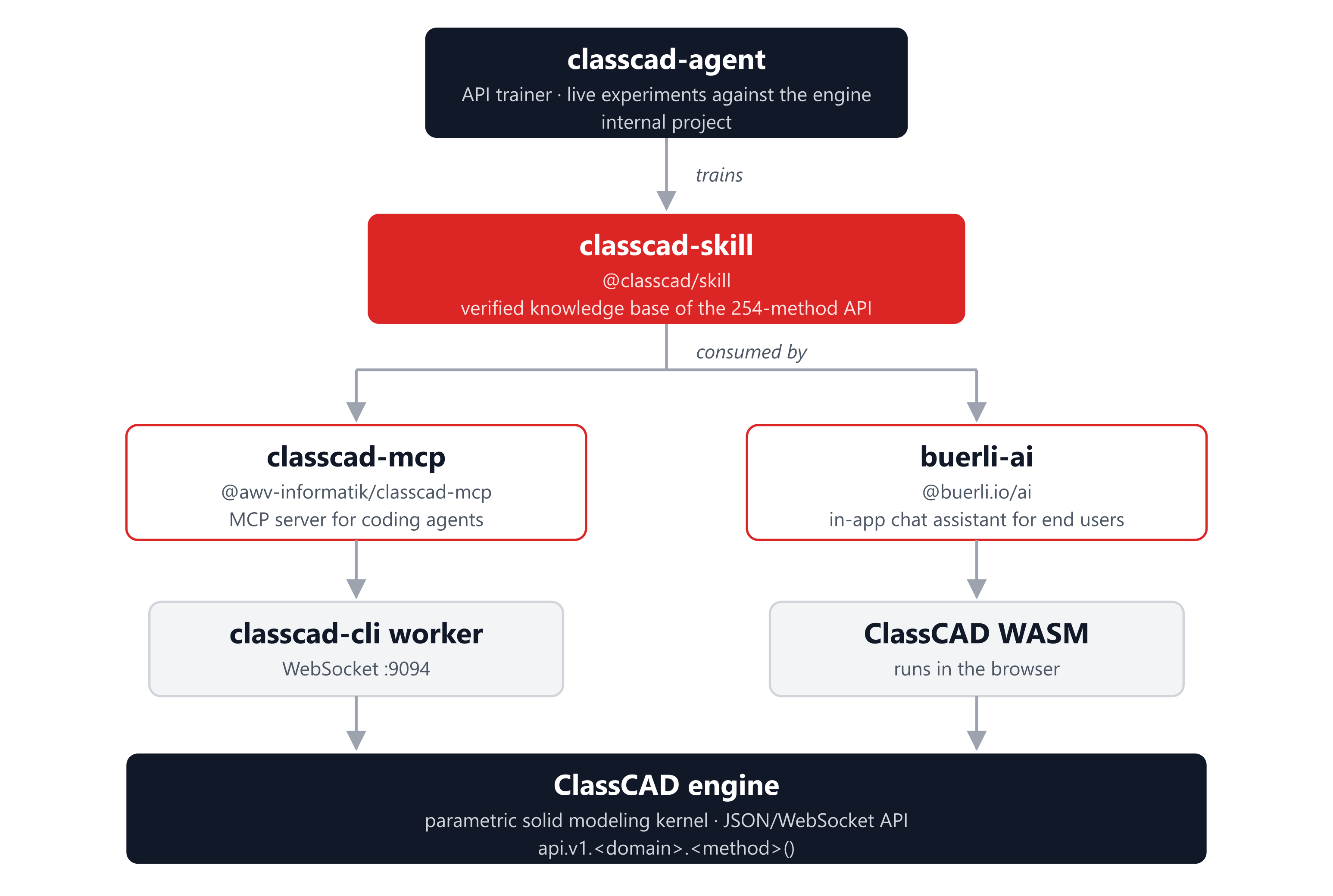
Because everything in ClassCAD goes through one well-defined v1.<domain>.<method> API, it is an ideal surface for LLMs to drive — if the model knows the API precisely. Raw LLMs hallucinate parameter names, misread the envelope structure and make spatial claims they can't back up. The four AI projects exist to close that gap and then exploit it:
- classcad-skill is the shared, verified knowledge base of the API.
- classcad-agent produces and maintains that knowledge by experimenting against a live engine.
- classcad-mcp exposes ClassCAD to coding agents (Claude Code, GitHub Copilot, …) over MCP.
- buerli-ai embeds the same capability as an end-user chat assistant inside the application.
classcad-agent
An AI agent that trains itself on the ClassCAD API and writes the skill.
classcad-agent (internally "cc — ClassCAD API Trainer") is the project that creates and maintains classcad-skill through live training sessions. It is an autonomous agent running inside a local-first agent orchestration platform. Cron jobs trigger sessions on a schedule; each session runs the full training pipeline unattended and commits its results, with a human reviewing the output between runs. This is the one project of the four that is not public.
A "live training" is a structured experiment, never theory. Each session:
- Picks the next unchecked task from an ordered learning plan — one task per API method or concept, dependency-ordered.
- Writes focused test scripts and runs them against a real running ClassCAD server via a harness that connects over WebSocket, executes the script with a typed
apiobject and captures logs, data dumps and rendered snapshots. - Records observations in a session journal — backing every spatial claim with numeric proof (vertex coordinates, bounding boxes, mass properties), not screenshots.
- Distills the verified findings into an LLM-oriented reference document (signatures, gotchas, common errors, a working example) and commits it into the skill.
The deliverable is the classcad-skill package itself. Hundreds of recorded sessions have accumulated over time, and the agent's identity and methodology are defined in its own set of top-level documents.
classcad-skill
The verified, agent-readable knowledge base for the ClassCAD API.
👉 https://github.com/awv-informatik/classcad-skill
classcad-skill (published as @classcad/skill) is an Agent Skill — a SKILL.md manifest plus a structured library of Markdown references that teach any LLM how to generate correct ClassCAD code. It is the single source of API truth shared by both classcad-mcp and buerli-ai, and it is the artifact produced by classcad-agent.
It contains two tiers of documentation plus generated lookup data:
- Source API docs — the ground-truth signatures for all 254 methods, taken from
@classcad/api-js. - Per-method LLM docs — battle-tested notes for individual methods: prerequisites, exact parameters, return shapes, gotchas and silent failures, error tables and runnable examples (e.g. the difference between corner-aligned
part.boxand centeredsolid.box). - Cross-cutting guides — for the workflows that span domains: constrained 2D sketching, the structure tree and the graphics protocol.
- Generated indexes — a method registry (every method plus signature and summary) and a single searchable bundle, built by the packaged tooling.
Consumers use it to discover methods, validate calls and fetch precise per-method help on demand — which is what powers the MCP's describe_method tool and the in-app agent's method index.
classcad-mcp
A Model Context Protocol server that lets coding agents drive a live ClassCAD session.
👉 https://github.com/awv-informatik/classcad-mcp
classcad-mcp (published as @awv-informatik/classcad-mcp) exposes ClassCAD to any MCP-capable host — Claude Code, VS Code Copilot, Cursor, Windsurf — over stdio. Under the hood it connects to a classcad-cli worker (the headless engine) over WebSocket (default ws://localhost:9094/, configurable) and forwards geometry operations to it. It pulls in @classcad/skill to power its method discovery and documentation.
The server registers a focused tool set:
- API dispatch —
call_api, the genericv1.<domain>.<method>caller. - Discovery / docs —
list_methodsanddescribe_method, both backed by the skill. - Live state —
tree,findandinspect(cached reads of the structure tree), plusclear. - Sessions —
session_infoanduse_sessionto attach to a named session shared with, for example, an open buerligons window for multi-client workflows. - Visualization —
snapshotrenders the model to an inline PNG, with iso/orthographic views, zoom and layers. - Persistence —
saveandloadfor OFB native, STEP, STL and JSON. - App bridge (optional) — tools that let a connected ClassCAD application expose and set its user selection, enabling two-way "pick in the UI, act from the agent" flows.
In effect, it turns ClassCAD into a tool that a developer's AI assistant can model with directly from the editor or the terminal.
buerli-ai
An in-app, natural-language CAD assistant embedded in the buerli front-end.
👉 https://github.com/awv-informatik/buerli-ai
buerli-ai (published as @buerli.io/ai) is the in-app AI integration — a portable React panel that adds a chat assistant to any buerli/ClassCAD application, showcased in buerligons. End users describe what they want in natural language ("create a 100×50×30 box, fillet all edges 3 mm, add a cylinder through it") and the agent builds or modifies the 3D geometry. Crucially, all CAD operations execute locally in the browser against the ClassCAD WASM engine — no dedicated AI backend is required.
It is provider-agnostic: the agent talks to any tool-calling LLM through a small LLMProvider interface, with built-in adapters for Claude, for OpenAI-compatible and multi-model endpoints (including local Ollama, LM Studio and vLLM) or for a custom provider. The model drives the CAD engine through structured tool calls — call_api / call_api_batch, tree / find / inspect, get_selection / set_selection, list_methods / describe_method, snapshot, file load and download, and delegate to specialist sub-agents.
The panel is a full assistant experience: streamed responses with collapsible thinking, per-tool status chips, image and CAD-file attachments (vision plus STEP/IGES/STL import), a context-usage meter, model and thinking pickers, and a source view that emits the equivalent buerli script for the whole conversation. Like the MCP server, it bundles @classcad/skill so the model always has the verified method index and per-method documentation in context.
How the pieces fit together
| Project | Package | Role | Talks to | Consumes |
|---|---|---|---|---|
| classcad-agent (internal) | — | Produces the skill via live training | ClassCAD server (WS :9094) | — |
| classcad-skill | @classcad/skill | Verified API knowledge base | — | — |
| classcad-mcp | @awv-informatik/classcad-mcp | CAD for coding agents (MCP/stdio) | classcad-cli worker (WS :9094) | @classcad/skill |
| buerli-ai | @buerli.io/ai | In-app chat assistant for end users | ClassCAD WASM (in browser) | @classcad/skill |
The flow is a virtuous loop: classcad-agent experiments against the live engine and writes down what actually works as classcad-skill; that single knowledge base is then embedded in both classcad-mcp, so developers' coding agents can model in ClassCAD, and buerli-ai, so end users can model by chatting inside the application. Every AI surface shares the same ground truth about ClassCAD's 254-method API, and every improvement the trainer makes flows out to both consumers.